Editing Prompts
The Prompt Box & Selection Tray
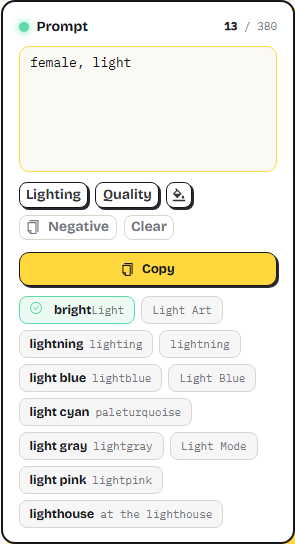
The prompt box accepts free-form input — separate entries with commas (,); full-width commas (,) from Chinese/Japanese keyboards are converted automatically. When you click anywhere outside the box, your text is tidied into tags automatically (duplicates removed, category info filled in). The Selected tray below the picking area lists every selected tag grouped by subject, each chip with its native-language gloss — click a chip to remove that tag without hunting through the tag cloud:

Smart Suggestions 🤖
Up to 10 related tags are suggested from your last-typed word — type in any of 18 languages. Exact library matches are highlighted with a ✓; click any suggestion to swap in just the word you're typing — everything before it stays put:
Templates & Tool Buttons 🧩
| Button | Purpose |
|---|---|
| Lighting | Append a portrait lighting template (Natural Lighting, Cinematic Lighting, …) |
| Quality | Append quality / detail / clarity enhancers |
| Randomize (palette icon) | Randomly swap color words to spark fresh ideas |
| Negative | Copy common negatives (blurry, bad anatomy, …) |
| Clear | Reset everything for a fresh start |
| Copy | Full-width primary button — copy the finished prompt |
Translate & Insert 🌐
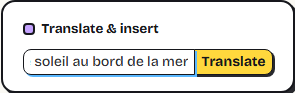
The Translate & insert panel below accepts any language: hit Translate to convert to English and append to your prompt. Several free services work as a relay (Google, Microsoft Edge, Youdao and more) — if one is unreachable, the next takes over automatically; anything translated recently shows up instantly without waiting again (e.g. toggling a tag off and back on). On non-English locales an auto-translation panel also renders your English prompt back into your language about 1.5 seconds after you stop typing, so you can verify the content:
🔒 Privacy note: only when you use translation is the text sent to the third-party services above; everything else stays entirely local.
Counter & Session Persistence 📊
- The character count lives in the prompt-box header — aim for ≤ 380 characters for reliable reproduction;
- Selected tags are kept automatically — reading this guide or an accidental refresh won't lose your work; closing the browser tab starts fresh;
- Each interface language keeps its own draft: switching languages shows that language's own selection (tag glosses and groupings are language-specific), and switching back restores yours exactly as it was;
- Theme and multicolor/monochrome preferences are remembered long-term.
Going deeper: Prompt Rules — weights, emphasis, and negative prompts.