Quick Start
IMGPrompt is a visual prompt dictionary — browse in your own language, output fluent English. 5,000+ bilingual tags compose into prompts for Nano Banana, GPT-Image-2, Midjourney, FLUX, Seedance, Veo, Kling and other mainstream models (Stable Diffusion and DALL·E syntax friendly too). No login; everything runs locally in your browser.
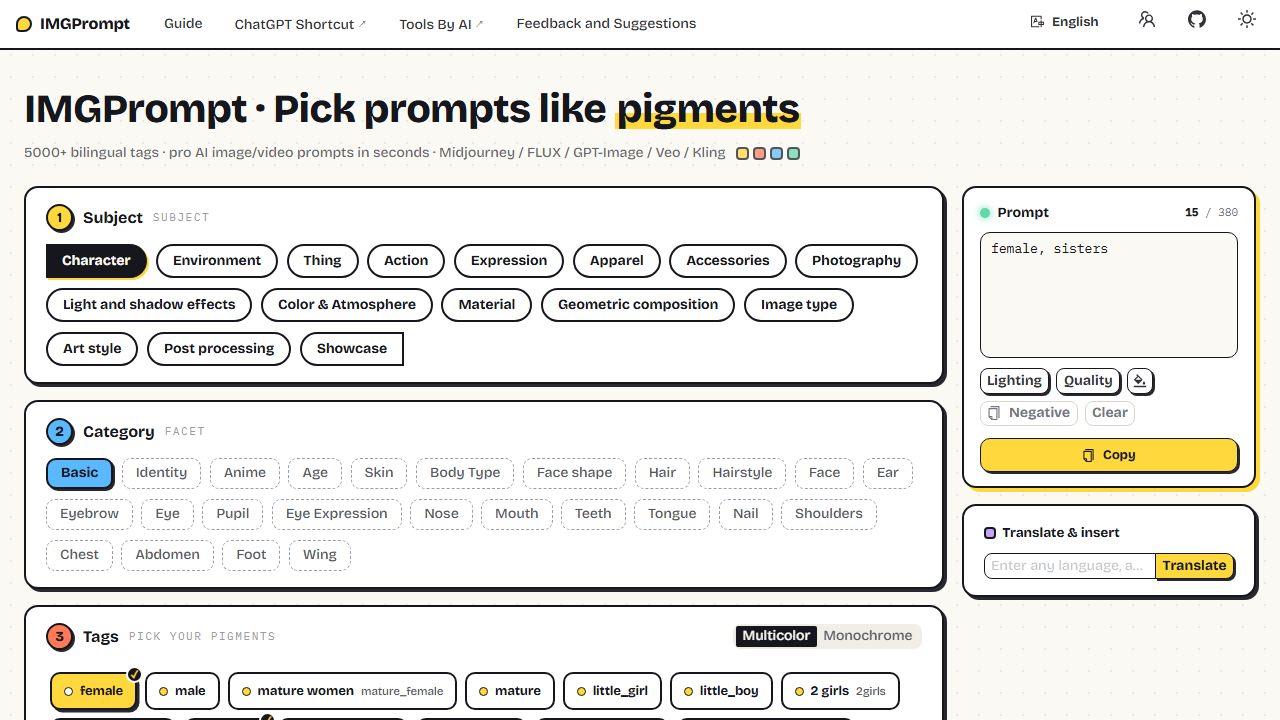
Three Steps to a Prompt
- Pick a category — choose a main category in ① Subject (Character / Environment / Photography…), then narrow down in ② Category.
- Click tags — in ③ Tags, click to add a tag to the prompt box; click again to remove. Hover (or long-press on touch) tags with images to preview examples.
- Copy — the prompt box assembles fluent English in real time. Hit the full-width Copy button and paste into any AI tool.
Try It Now
- Subject Character, Category Basic, click female;
- Switch Subject to Light and shadow effects, Category Lighting effects, click Cinematic Lighting;
- Hit Copy — you now have
female, Cinematic Lighting. Under 30 seconds.
Where to Next
- Picking Tags: image previews, multicolor/monochrome modes, sharing your current view
- Editing Prompts: free-form input, smart suggestions, one-click templates, translate from any language
- Prompt Rules: write prompts that reproduce reliably
Prefer a desktop app? See Desktop Client. Want to import your own tag library or self-host? See Prompt Data and Deployment.